













































Once again, I must emphasize that this isn’t the most complete or most accurate picture of what goes on, but it’s entirely accurate for most DevOps tasks.
With that aside, let’s recap what we’ve learned so far:

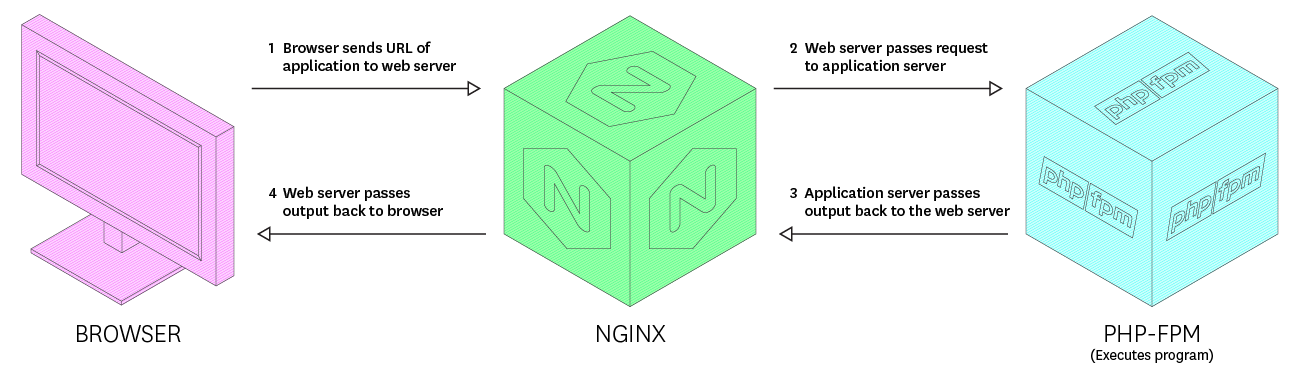
- PHP doesn’t directly receive requests sent by browsers. Web servers like Nginx first intercept these.
- The web server knows how to connect to the PHP process, and passes on all the request data (literally pastes everything over) to PHP.
- When PHP is finished doing its part, it sends the response back to the web server, which sends it back to the client (or browser, in most cases).
Or graphically:
Great so far, but now comes the million-dollar question: what exactly is PHP-FPM?

The “FPM” part in PHP stands for “Fast Process Manager”, which is just a fancy way of saying that the PHP running on a server isn’t a single process, but rather some PHP processes that are spawned, controller, and killed off by this FPM process manager. It is this process manager that the web server passes the requests to.
The PHP-FPM is an entire rabbit hole in itself, so feel free to explore if you wish, but for our purposes, this much explanation will do. 🙂
Why optimize PHP-fpm?
So why worry about all this dance when things are working all right? Why not just leave things as they are.

Ironically, that is precisely the advice I give for most use cases. If your setup is working fine and doesn’t have extraordinary use cases, use the defaults. However, if you’re looking to scale beyond a single machine, then squeezing out the max from one is essential as it can cut down the server bills in half (or even more!).
Another thing to realize is that Nginx was built for handling huge workloads. It’s capable of handling thousands of connection at the same time, but if the same isn’t true of your PHP setup, you’re just going to waste resources as Nginx will have to wait for PHP to finish with the current process and accept the next, conclusively negative any advantages that Nginx was built to provide!

So, with that out of the way, let’s look at what exactly we’d change when trying to optimize php-fpm.
How to optimize PHP-FPM?
The configuration file location for php-fpm may differ on the server, so you’ll need to do some research for locating it. You can use find command if on UNIX. On my Ubuntu, the path is /etc/php/7.2/fpm/php-fpm.conf. The 7.2 is, of course, the version of PHP that I’m running.
Banda Aceh

Jakarta Pusat

Kalimantan Tengah

Palembang

Palu
Pangkal Pinang
Pekanbaru

Tapaktuan
Aceh Tenggara
Sumatera Utara
Sumatera Barat
Kota Langsa
Kalimantan Barat
Kalimantan Selatan
Kalimantan Timur
Kalimantan Utara




























































































Beri Komentar